Tuesday, 25 October 2016

Korg Volca DIY Stand Guide

Korg Volca DIY Stand


I’d seen lots of nice looking, but very expensive cases for the Korg Volca series, so to save some money I thought I’d try to build my own, with the very real possibilty of losing a few fingers :-)  

It actually all turned out pretty ok with no digits lost, however the problem I did have was with the case of the volca stand; this was either my poor woodworking skills or perhaps not having the correct equipment.

Where the case has a fold in it I managed to nick the other side, so it isn't quite as neat as it should, but it’ll do for now.  It's maybe a job for a dremel to do properly.  

I found that I had to use a thicker piece of wood for where the Volca sits, as otherwise because of the size of the screws, the wood will split (you could of course use smaller screws here but I didn’t have any).


To build the stand I used;

6.5mm Birch Plywood (250mm x 500mm) €2.60 from Modulor Berlin excl. delivery

9mm Birch Plywood (250mm x 500mm) €3.30 from Modulor Berlin excl. delivery

Black 3,9x30mm screws (€5-ish for 800 from Toom)


You'll also need;

saw/table saw
sander
ruler
pen/pencil
sheet of paper
drill
tape


I started by drawing out the angles of the stands, there were a couple of different angles I could have used, but I finally settled on 30 & 60 degrees.  One thing to note here is that you can turn the stand upside down and use the reverse angle, which gives a sharper incline.


…Then I drew around the sides of the actual instruments, with them being at the correct angles and figured out the correct dimensions from here (remember to give yourself some lee-way here, hence the 11.5cm volcas shown below are each given 11.7mm).  This give you a nicer edge without risk of the Volca overhanging.


Now draw this out on paper...  using the edge of the paper as an exact 90 degree angle (as I'm sure this'll be straighter than anything I could ever cut.


With the paper cut out (use only one piece of paper and simply reverse it for the other-side, you'll save time and get the exact duplicate), now mark out the outline on the wood.


Lovely! Now mark the other one out. 

TIP: Make sure you use the 90 degree angle of the wood, unless you have some quality cutting equipment (again, the people cutting this have better equipment than me, so I'm relying on them to cut straight.  Not the best method really, but what can you do)


With both sides marked, it's now time to cut them out.  To make this slightly easier while using a tablesaw, I'll cut the board into more manageable pieces (you might not need to do this if you're using a saw).


Cutting the wood into more manageable sized pieces...


Then cut out the main bits


At the intersection of the two Volcas, it's almost impossible to cut accurately...


...But with a little patience you can achieve an acceptable result


Cutting the 9mm wood: Use this picture to help cut the board. The length should be the same with as the Volca and the width can be shorter than a volca, as long
as it can sit on the wood without tipping over.


I used: 19.4cm x 9.8cm


The edges will be rough after cutting so we'll sand them down


I used a sander but sand paper will also work.


To smarten up the badly cut intersection, I used these files that you can get in Maplin.


Once all this was complete the boards came out looking pretty good:


Here's a little gif of the preceding steps;


Now we need to think where to sit the board that will hold up the Volcas.  To do this I marked out a line underneath the Volcas while positioned correctly on the board.


Remember the board needs to be 9mm otherwise it'll split , unless maybe you're using smaller screws than me then you might get away with it.  


Roughly draw out the 9mm board outline using a ruler - making sure it won't overhang or anything.

You only need to mark out one board for this.

Use a ruler to find two centre spots for the
two screw slots (look at the picture if that doesn't make sense!).  Remember the distances for later.


Now secure the two sides together using tape.  Make sure they're tight and don't move.


 Also mask where the drill holes will be.  This'll help prevent the wood from splintering.


With them secured, drill through both pieces at once.


Photo of all four drill holes successfully drilled.


Hopefully you've remembered the distances of the holes, because you need to now mark the same on the two pieces of 9mm wood


Now carefully drill the exact centres of the wood.  This will create a guiding line for the screw.


Now put the screw in the sides, but don't go through all the way yet;


With the screws just barely poking through the sides line up the 9mm wood


Then slowly turn the screws

Tip:  only give a few turns on each side of the screw before changing to the other screw so they go through evenly and at the same time.


 Go slowly so you stay precise and don't split the board


It should be looking almost finished by now, we just need to do the same with the other side.


Now just add the volcas!  You may have to loosen one side to get the volcas in, if this is the case then at least they'll be snug and won't fall out (be careful you don't over tighten it and squash the machines!).  

If you've left too much room you have two options; you can either sand down the side of one end of the 9mm board until the fit, or secure them in place with some double sided velco.


I personally think these stands looks pretty snazzy as is, but you could easily varnish them now if you so wish.

I hope this guide helps somebody!


Tuesday, 18 October 2016

BTEC Electronic Engineering

BTEC Electronic Engineering


ICS (international correspondence schools), are a company based in Scotland who run a used to run a BTEC Electronic Engineering Course (I think it's been cancelled now as I couldn’t find a link to it on their website)?  You get sent a pair of folders, containing the course for you to work through, an introductory electronics book, and also you get a lot of support from tutors via email, which is just as well as it cost £800 ($1000!).  This was back in the day (2014) before I’d discovered the near-free EdX.  Still, the course was pretty in-depth, I think the equivalent level is probably UK college, with occasional steps touching university level;  There are a lot of math and calculations to get through, but it's not overly-technical (I managed it with help from the tutors, reading the forums, and lots of retries).  This proved a good way to learn with only slight bouts of frustration, but I wish I’d completed the EdX algebra course before hand as I was pretty rusty on the maths side of things.  You get one year of support and must complete the course in that time to qualify for the certificate, otherwise you have to pay extra for an extension.  It certainly takes a lot of effort to complete it all in that time especially if you’re working a full time job, but with dedication it is more than possible, and you’ll come away with a good foundations to electronics theory, but very little practical (the fun part!).  That’s what building synthesiser is for I guess?

Tuesday, 11 October 2016

JYE Tech DSO138 DIY Oscilloscope Kit & XR2206 Function Signal Generator


JYE Tech DSO138 DIY Oscilloscope Kit and XR2206 Function Signal Generator


Banggood were having a sale (surprise!) so I picked up a JYE Tech scope and a XR2206 function generator for £20 and £7 respectively.

The DSO138 is a sweet little scope and a fun kit to boot.  Obviously it's not going to out-perform the work of a €200+ scope (like some reviewers seem to be complaining about), so as long as your bear that in mind it's pretty awesome and for the price it can't be beaten;

Link to banggood website

JYE confirmed the version Banggood supplied was genuine (using the supplied registration
number), so no worries there.   Apparently there are lots of low quality fakes on ebay/Amazon that don't actually sell for cheaper than the JYE version.  Shop with caution!

I went for the SMD pre-soldered option as I was away working when I built this...  using a less than ideal iron.  Plus I'd probably fluff up the SMD work.  Luckily the instructions given were actually very good, but there was nothing on how to build the case (which isn't as straight forward as you might first think) but a quick search on youtube sorted this out:


The supplied cardboard box also fits the scope perfectly after building, so make sure you keep that.  Total build time was about 3 hours and (blimey!) was working upon first powering up!

Here's some pictures of the build;


The kits come neatly packaged, however you'll need to figure out the respective values of the parts.


Sorting the resistors using a multimeter (I don't trust myself to remember the colour-code).


The two sided manual was easy to read and even in colour!
Luckily the hardest work had already been completed for me.
Populating the board with resistors.
Adding the buttons, diodes, oscillator etc.
Capacitors added.
The legs of the ceramic caps were not the best quality, so watch they don't snap if you bend them a few times.
Populating the board with the remaining connectors.
Before adding the screen, you can power up the board and check the voltages are correct at various test-points around the board.  Once confirmed these are ok, you bridge a safety point with solder.
The voltages were all ok, so I didn't need to trouble-shoot, but the manual does give a few hints if you need it.
With the screen added you could now run the scope in test mode.  It all looked good to me so I built the case and now have myself a nice little test scope.

That was the build of the JYE138 scope, looking on banggood it now looks like a '150' version is available for only a couple of euros more.  I've no idea if it's an improvement, but the number is bigger so it has to be, right?

XR2206 Function Signal Generator DIY Kit


While ordering the JYE scope I thought I'd pick up this little function generator at the same time.  The build was easy again except for the acrylic case, although not as much a problem as the 138.  Just looking at the pictures on banggood was enough to figure it out.


The kit arrives in a compact bag.
You'll need to sort through the parts to figure out their values.
 Resistors added to the pcb.
Capacitors added.
...Now sockets
...Finally the buttons and connectors.
The case even has text engraved letting you see which frequency and waveform is selected.

All-in-all both kits were a great way to spend a rainy afternoon, and hopefully these modules will be of some use in the future.

Monday, 10 October 2016

My First PCBs / Kicad Design Course

My First PCBs / Kicad Design Course


I took another online learning course back in 2014, this one about PCB design using KiCad.  Even though KiCad is a bit of monster, this course made it as effortless as possible to navigate;


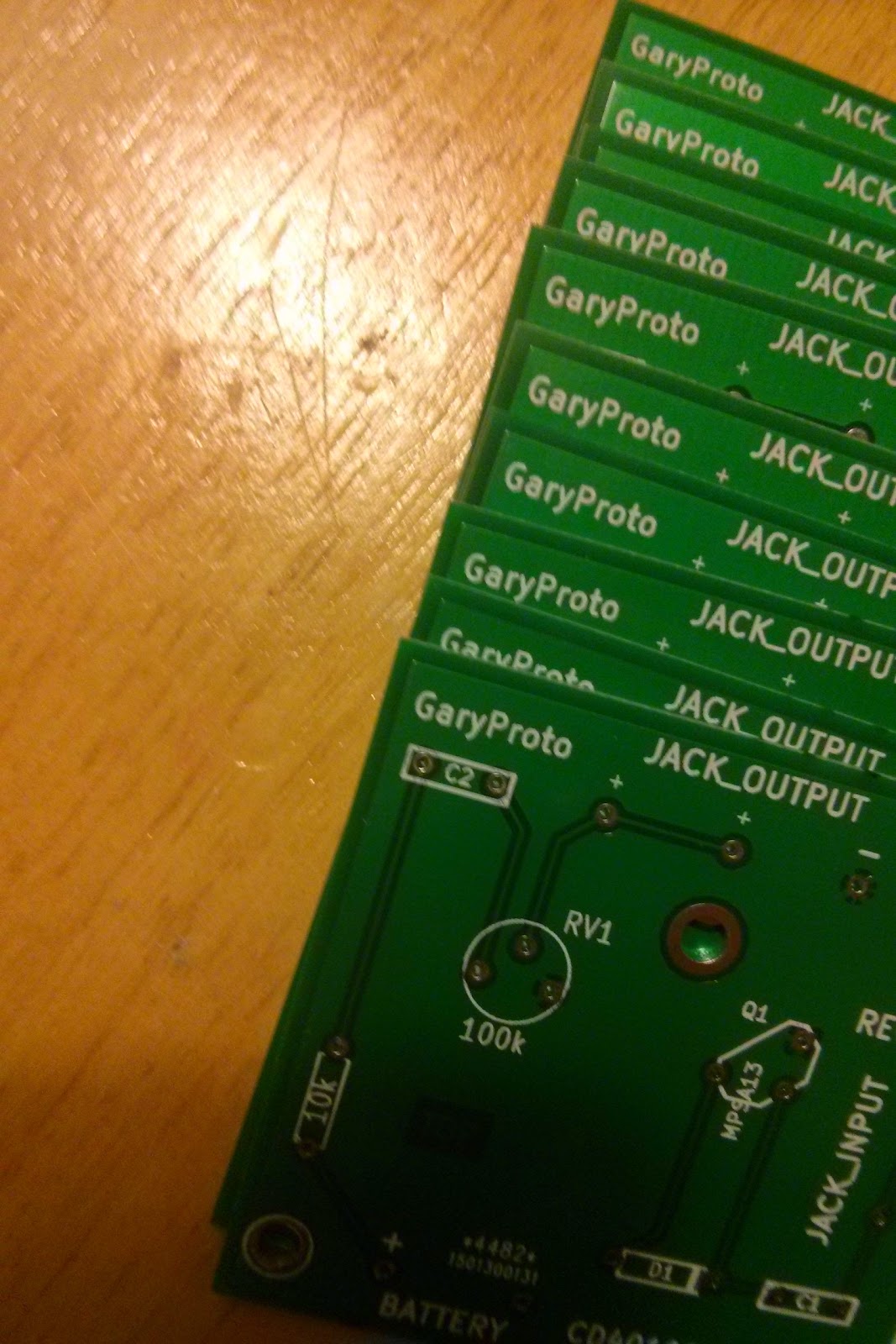
For my first PCB attempt I wanted to stick with something so simple that even I couldn't mess it up, so I decided on the Bazz Fuss guitar pedal from the  home-wrecker website here;


As you can see, I've spaced everything far to far apart; I think the board measures 5x5cm, which is probably enough room to fit 4 versions of the circuit on, but the main thing is that it works, so at least I didn't mess that up!

The boards were ordered from;


...who are incredibly cheap: Ten 5x5cm boards for $14, which is almost free isn't it?  Delivery did take a while, but if I'd have wanted it quicker I should've paid more.  Although I'd never printed boards before, the quality looks pretty good to me.

What I'll know to do differently for next time; Without doubt I'd add lots of testing points just so it's easier to add extra features...  say I wanted an on/off switch, which I suppose could've added to the battery jack, but it'd have been a lot less hassle to have it come from a spare test point.  I might also consider putting multiple circuits on one board, then using the table saw to cut them up.  That way you could get even more for your money.

Overall though I'd consider this first attempt a success :-)


Monday, 3 October 2016

Don't Drink Wine Whilst Soldering

Don't Drink Wine Whilst Soldering

It seems pretty obvious once it's been said, but you shouldn't solder whilst drinking wine!

Sadly I found out the hard way, but it did make me finally upgrade my soldering iron.  I was using an Antex ER30 which has an incredibly short cable.  As I lifted it up the stupid cable got caught at the bottom of the desk and the iron slid out of my hand and I found myself holding the tip.  To be honest, I think this would've happened with or without the wine, but the wine certainly helped afterwards.

Anyway, after this I started looking for a new iron and I was recommended either a Weller or Hakko.  The Hakko's were more in my price range but nobody bloody seems to sell them in Europe.  That would be a good business importing them if you need a business idea.  You can import them easily enough from China on eBay, but there are so many fakes I thought it wasn't the risk (buy cheap buy twice)  So I ended up looking for a Weller Iron; the WHS40 analogue model;


The digital model lets you set the temperature more precisely, but the analogue model seemed good enough for my needs.  Soldering with this thing, suddenly I found all my solder work looking amazing. Like somebody that knows what they're doing (which isn't me).  It really is a step up from the cheaper Antex and if you're looking for a new soldering iron I can recommend the Weller.  A number of reviews complained about the tip sticking into place, but I always loosen it and re-tighten it before turning it on and haven't had a problem in the two years I've now owned it.

If you're broke, here's a link to the Antex ER30, which although it nearly cost me the use of my hand, it's still better than the super-cheap no name brand irons available (just watch the short cable though;